
This is my notepad.
A small pizzeria serves two local villages. Following the Napoli tradition, they have a simple menu:
This sample project will help them with a digital transformation.
function generate_sprintzero_invitation {
  exit
  curl https://api.openai.com/v1/chat/completions   -H "Content-Type: application/json"   -H "Authorization: Bearer $OPENAI_API_KEY"   -d '{
    "model": "gpt-3.5-turbo",
    "messages": [
      {
        "role": "system",
        "content": "You are a an assistant working in a silicon valley technology company. You use elements of humour whilst staying quite formal."
      },
      {
        "role": "user",
        "content": "Generate the text for a calendar invitation for 5 days of workshops. The workshops will follow the Google Ventures Design Sprint approach. The challenge is to build a digital experience for a pizza company called Perfect Pizza. Please also generate a list of attendees by role."
      }
    ]
  }'
}# Start at the end
# Newspaper headline: Perfect Pizza serves the community throughout COVID
# Map the challenge
# - Define the customer experience
# - Transform existing cooking and delivery processes
# - Request customer feedback to maintain a personalised experience
# Ask the experts
# - Interview the owner
# - Interview the chef
# - Interview the delivery driver
# Choose a target
# - We won't significantly change the tills or kitchen
# - We will only deploy a website for customers and drivers
# - We will connect a single new screen in the kitchen# Remix and improve
# - Add fastfood style kiosks at the entrance
# - Set up deliveries to vaccination centres
# - Convert the existing menu to a website
# Sketch
# <omitted>
# Recruit
# - Found 5 friendly customers to test our prototype
# TODOA quick and dirty prototype was created. This is built as a single HTML page, with all logic happening client side for testing purposes only. Before the idea is validated, we do not want to spend any time on creating a production-ready solution.
Try it out here.
function perfect_pizza_prototype {
  mkdir perfect_pizza_prototype
  (cd perfect_pizza_prototype &&
  cat << 'EOF' > index.html
<html>
  <style>
  table, th, td {
    border: 1px solid black;
    border-collapse: collapse;
  }
  </style>
  <body onload="renderPage()">
    <h1>Perfect Pizza Prototype</h1>
    <button onclick="switchRole()">Customer/Staff</button>

    <div id="order" style="display:none">
      <h2>Order</h2>
      <form id="frmOrder">
        <label>Name:</label><br><input type="text" id="frmName"><br>
        <label>Address:</label><br><input type="text" id="frmAdd"e"><br>
        <label>Items:</label><br><input type="text" id="frmItems"><br>
        <button id="btnSubmit" onclick="submitOrder()">Submit</button>
      </form>
    </div>

    <div id="manage" style="display:none">
      <h2>Manage Orders</h2>
      <table id="tblOrders" style="border: 1px solid black">
      </table>
    </div>

<script>
  if(!localStorage.getItem("curState")) {
    const defaultState = {
      role: "customer", // customer or staff
      orders: [{
        name: "Adam",
        address: "Blue Cottage, Main Street",
        items: "1x margherita",
        status: "new"
      }]
    };
    localStorage.setItem("curState", JSON.stringify(defaultState));
  }
  function submitOrder() {
    const myName = document.getElementById("frmName").value;
    const myAdd = document.getElementById("frmAdd").value;
    const myItems = document.getElementById("frmItems").value;
    let curState = JSON.parse(localStorage.getItem("curState"));
    curState.orders.push({
      name: myName,
      address: myAdd,
      items: myItems,
      status: "new"
    })
    localStorage.setItem("curState", JSON.stringify(curState));
    document.getElementById("frmName").value = "";
    document.getElementById("frmAdd").value = "";
    document.getElementById("frmItems").value = "";
    renderPage();
  }
  function switchRole() {
    let curState = JSON.parse(localStorage.getItem("curState"));
    curState.role = ( curState.role == "customer" ? "staff" : "customer" );
    localStorage.setItem("curState", JSON.stringify(curState));
    renderPage();
  }
  function switchStatus(name) {
    let curState = JSON.parse(localStorage.getItem("curState"));
    curState.orders.filter(x => x.name == name)[0].status = "done";
    localStorage.setItem("curState", JSON.stringify(curState));
    renderPage();
  }

  function renderPage() {
    let curState = JSON.parse(localStorage.getItem("curState"));

    //show correct page
    document.getElementById('order').style.display = (curState.role == "customer" ? "initial" : "none");
    document.getElementById('manage').style.display = (curState.role != "customer" ? "initial" : "none");

    //render table content
    document.getElementById('tblOrders').innerHTML='';
    curState.orders.forEach(order => {
      const tr = document.getElementById("tblOrders").insertRow();
      tr.insertCell().appendChild(document.createTextNode(order.name));
      tr.insertCell().appendChild(document.createTextNode(order.address));
      tr.insertCell().appendChild(document.createTextNode(order.items));
      tr.insertCell().appendChild(document.createTextNode(order.status));
      if(order.status != "done") {
        const btnDone = document.createElement("button");
        btnDone.setAttribute("id", "btn" + order.name);
        btnDone.textContent = "Done";
        tr.insertCell().appendChild(btnDone);
        btnDone.addEventListener('click', (e) => {
          name = e.target.id.replace(/^btn/,"");
          switchStatus(name);
        });
      }
    })
  }
</script>
  </body>
</html>
EOF
  )
}# TODOTODO: The tools I will demonstrate in a reference project. Just an example structure for now.
| Tool | Prototyping/Solo | Startup/Small team | Enterprise |
|---|---|---|---|
| Server Hosting | Raspberry Pi | Linode | GCP/AWS |
| Source Control | Local Git | GitLab OSS | GitHub |
| Backlog/Project Management | TODO/taskwarrior | GitLab OSS | GitHub |
| Build | busybox sh/make |
platform-specific (npm, mvn) | Cloud image builds |
| Test | busybox sh -e/ab |
cucumber/platform-specific/wrk2 |
cloud testing tools for multiple platforms and distributed load testing |
| APIs | busybox httpd |
kong OSS | Kong Enterprise / Apigee X or Hybrid |
| Documents | txt + git | wiki | google docs |
I like to keep things simple. I strive to develop expertise in a small number of powerful, platform-agnostic open-source tools. This means that with a browser and a terminal I have my favourite tools available and avoid vendor lock-in.
My development environment follows me. Whether using Linux, Windows and Busybox-w32, Mac OS and Docker or Android and Termux I have what I need.
I like to start with an Alpine Linux base. I appreciate the philosophy, lightness, simplicity and POSIX compliance of its components. For a while I was put off by muslibc’s lack of DNS over TCP, however this is resolved in newer versions.
I occasionally need to make exceptions when using tools that require glibc or have no ARM support, however I can fallback to SSHing into a remote VM when needed.
Full applications run in Docker, K8s or a SaaS so are not included in my development environment.
curl -sSL https://seandavis.sh/raw | sh - -- install_dev_env
function install_dev_env {

  cat << 'EOF' > /etc/apk/repositories
http://dl-cdn.alpinelinux.org/alpine/v3.18/main
http://dl-cdn.alpinelinux.org/alpine/v3.18/community
https://downloads.1password.com/linux/alpinelinux/stable
EOF

  wget https://downloads.1password.com/linux/keys/alpinelinux/support@1password.com-61ddfc31.rsa.pub -P /etc/apk/keys || echo "1pass key present"

  apk update
  apk add git tmux curl busybox-extras pandoc gettext openjdk17 graphviz \
    docker expect asciinema chromium chromium-chromedriver xvfb-run jq weasyprint less \
    1password-cli github-cli tree cargo rust font-dejavu py3-pip ffmpeg
  apk add kubectl --repository=http://dl-cdn.alpinelinux.org/alpine/edge/community
  apk add mdp --repository=http://dl-cdn.alpinelinux.org/alpine/edge/testing


  curl -sSL \
    "https://github.com/plantuml/plantuml/releases/download/v1.2023.11/plantuml-1.2023.11.jar" \
    -o /opt/plantuml.jar
  java -jar /opt/plantuml.jar -testdot
  curl -s https://raw.githubusercontent.com/k3d-io/k3d/main/install.sh | sh

}
function install_dev_env_desktop { setup-xorg-base; apk update; apk add dwm setxkbmap; echo -e "setxkbmap gb &\nexec dwm" > .xinitrc }
Download aarch64 raspberry pi version on Alpine from here
curl -sSLO https://dl-cdn.alpinelinux.org/alpine/v3.18/releases/aarch64/alpine-rpi-3.18.4-aarch64.tar.gz
Insert SD card and get the name with fdisk -l
(something like /dev/sda)
In a limited environment, you can use CLI tools but I generally
use gparted to:
Place alpine setup files
mount /dev/sda1 /mntcd /mnt && cp ~/Downloads/alpine-rpi*.tar.gz && tar -xvzf *tar.gz && rm alpine-rpi*.tar.gzecho -e "enable_uart=1\notg_mode=1" >> usercfg.txtecho -e "over_voltage=6\narm_freq=2000\ngpu_freq=750" >> usercfg.txtecho -e "disable_overscan=1\ndtoverlay=vc4-kms-v3d\nmax_framebuffers=2\ndtparam=audio=on\ncamera_auto_detect=1\ndisplay_auto_detect=1" >> usercfg.txtecho "cgroup_memory=1 cgroup_enable=memory" >> /boot/cmdline.txtcd ~ && umount /mnt && syncPut SD Card in RPI and boot
setup-alpine interactively using sys mode
follow steps in install_dev_env_desktop
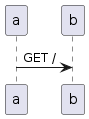
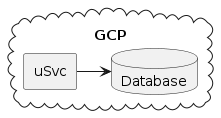
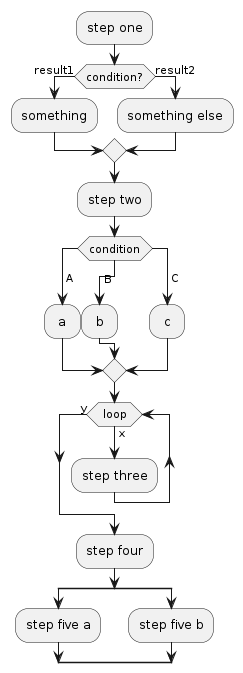
Learning the syntax of plantuml has allowed me to transfer the benefits of in-person whiteboarding into a remote environment, and the ability of storing the source for a diagram in version control is much easier to manage than an presentation or UI diagramming tool.
Typically I will create mindmaps, sequence, flow and component
diagrams. For anything else, I will create a plaintext file in
vi.
function demo_plantuml_seq {
  cat << 'EOF' | java -jar /opt/plantuml.jar -p > demo_plantuml_seq.png

@startuml
a->b: GET /
@enduml

EOF
}
function demo_plantuml_component {
  cat << 'EOF' | java -jar /opt/plantuml.jar -p > demo_plantuml_component.png

@startuml
cloud GCP {
  rectangle uSvc as ms
  database Database as db
  ms->db
}
@enduml

EOF
}
function demo_plantuml_flow {
  cat << 'EOF' | java -jar /opt/plantuml.jar -p > demo_plantuml_flow.png

@startuml
:step one;
if (condition?) then (result1)
  :something;
else (result2)
  :something else;
endif
:step two;
switch (condition)
case ( A )
 : a ;
case ( B )
 : b ;
case ( C )
 : c ;
endswitch
while ( loop ) is (x)
  :step three;
endwhile (y)
:step four;
split
  :step five a;
split again
  :step five b;
end split
@enduml

EOF
}
Docker is the most important tool in my toolbox. With access to
docker I can spin up a lightweight development environment, run prebuilt
images from docker hub, run a headless browser, diff a container after
running a process to see while files have changed and even
rm -rf without fear. Once software has been built in
Docker, it can then be run on many platforms including in a container
orchestration platform for production. I store all state in Dockerfile
or mounted volumes, so I can regularly clean up with
docker rm -f $(docker ps -a -q).
Deploying to EKS or GKE costs money. For local development there are
a number of options. I use k3d as the only requirement is a
docker environment and at the time of write, kind doesn’t
play nicely with ARM devices.
function demo_k3d {
  k3d cluster create -p "8080:80@loadbalancer"

  # Useful for overwriting current kube config:
  # k3d kubeconfig write k3s-default --output ~/.kube/config

  docker ps
  kubectl cluster-info
  docker pull nginx:latest
  docker tag nginx:latest my-nginx:0.1
  k3d image import my-nginx:0.1 # similar to publishing to a registry - note this doesn't work for :latest
  kubectl create deployment nginx --image=my-nginx:0.1
  kubectl create service clusterip nginx --tcp=80:80
  kubectl create ingress nginx --rule="/=nginx:80"
  timeout 30 sh -c "while ! curl -f localhost:8080/; do sleep 2; done"

}Recording terminal sessions can be a little bit painful. When live
recording, there can be lots of typos and unnecessary pauses. When
scripting, tmux is often used to send-keys
without human interaction, but given the complexity of waiting for long
running commands to complete, many people resort to random
sleep 10 commands. sleeps have their place for
allowing a viewer to read the screen, but not when you have to estimate
how long a command will run for.
Once the recording is complete, you also have to consider how it will
be viewed. script and scriptreplay are great
locally, but a gif or embedded video is often desired in a
web page for normies to view.
After some experimentation, I found a sweet spot with
expect, asciinema and a local
asciinema-player instead of pushing to their website.
Thanks for the inspiration Waleed.
function demo_expect_asciinema {
  cat << 'EOF' | expect -f -
set timeout 5
set send_human {0.1 0.3 1 0.05 1}
spawn asciinema rec --cols 60 --rows 15 out.cast

expect "~/seandavis.sh/target #"
send -h "echo Hello, world!"; sleep 2
send "\r"
expect "Hello, World!" -timeout 1

send -h "vi"; sleep 2
send "\r"; sleep 2

send -h "ihello"; sleep 2
send -h "\x1b"; sleep 2
send -h ":q!"; sleep 2
send "\r"
send -h "exit\r\n"

EOF
}
function demo_simple_rec {
cat << 'EOF' | expect -f -
set timeout 5
set send_human {0.1 0.3 1 0.05 1}
spawn asciinema rec --cols 60 --rows 15 simple.cast
expect -timeout 2
send -h "sh seandavis.sh install_dev_env"; sleep 2
send "\r"
expect "~/seandavis.sh/target #"
EOF
}Run a function and output the result
function sample_fn {
  echo "hello"
}
function run_and_record {
  cat << 'EOF' | expect -f -
set timeout 5
set send_human {0.1 0.3 1 0.05 1}
spawn asciinema rec --cols 60 --rows 15 runrec.cast

expect -timeout 2
send -h "sh seandavis.sh sample_fn"; sleep 2
send "\r"
expect -timeout 5
send -h "exit\r\n"
EOF
}
Busybox has a great core set of tools. With minimal POSIX versions of
vi, sed, awk, httpd
and sh you can build quite powerful solutions for
prototyping or deployment on embedded/lightweight devices. Busybox is
also tiny and comes as standard in Alpine Linux.
In a few lines, I can build a website:
function prototype_busybox_web {
  mkdir -p prototype_busybox_web
  (cd prototype_busybox_web &&
    echo '<html><body><p>Hello World!</p></body></html>' > index.html &&
    httpd -p 8081 -h .
    while ! curl -f http://localhost:8081/; do sleep 1; done)
  pkill httpd
}
I can also build a (very limited) API:
function prototype_busybox_api {
  mkdir -p prototype_busybox_api
  (cd prototype_busybox_api &&
    mkdir -p cgi-bin
    cat << 'EOF' > cgi-bin/ping
#!/bin/sh

echo "Content-Type: text/plain"
echo ""
echo "PONG!"
echo ""
POST_DATA="$(cat)"
echo "POST_DATA=$POST_DATA"
echo "QUERY_STRING=$QUERY_STRING"
echo "REQUEST_METHOD=$REQUEST_METHOD"
echo "PATH_INFO=$PATH_INFO"
printenv | grep '^HTTP'

EOF
    chmod +x cgi-bin/ping
    httpd -p 8081 -h .
    while ! curl -f http://localhost:8081/cgi-bin/ping; do sleep 1; done
  )
  pkill httpd
}
I can build a proxy…
function prototype_busybox_proxy {
  mkdir -p prototype_busybox_proxy
  (cd prototype_busybox_proxy &&
    echo 'P:/:httpbin.org/' > httpd.conf &&
    httpd -p 8081 -c httpd.conf
    while ! curl -f http://localhost:8081/get; do sleep 1; done)
  curl http://localhost:8081/get
  pkill httpd
}
Lets do the same for a database with an API interface that writes to a CSV file.
function prototype_busybox_db {
  mkdir -p prototype_busybox_db
  (cd prototype_busybox_db &&
    mkdir -p cgi-bin
    cat << 'EOF' > cgi-bin/db
#!/bin/sh

###
# A dummy CSV flat file DB, accessed via API
#   using busybox only. No validation. Uses timestamps as ids.
#   Doesn't set content-length so requires the HTTP client to close
#   the connection. No API security.
###

POST_DATA="$(cat)"

# firstly, make sure the db exists
touch db.csv


# CREATE
if [ "$REQUEST_METHOD" = "POST" ] && [ ! $PATH_INFO ]; then
  echo "HTTP/1.1 201 Created"
  echo "Content-Type: text/plain"
  echo ""
  ID=$(date +%s%3N)
  echo "$ID,$POST_DATA" >> db.csv
  awk "/^$ID,/{ print \$0 }" db.csv
# READ ALL
elif [ "$REQUEST_METHOD" = "GET" ] && [ ! $PATH_INFO ]; then
  echo "Content-Type: text/plain"
  echo ""
  cat db.csv
# READ ONE
elif [ "$REQUEST_METHOD" = "GET" ] && [ $PATH_INFO ]; then
  echo "Content-Type: text/plain"
  echo ""
  ID=$(echo "$PATH_INFO" | sed 's/\/\(.*\)/\1/')
  echo "debug:$ID"
  awk "/^$ID/{ print \$0 }" db.csv
# UPDATE ONE
elif [ "$REQUEST_METHOD" = "PUT" ] && [ $PATH_INFO ]; then
  echo "Content-Type: text/plain"
  echo ""
  ID=$(echo "$PATH_INFO" | sed 's/\/\(.*\)/\1/')
  sed -i "/^$ID/d" db.csv
  echo "$ID,$POST_DATA" >> db.csv
  awk "/^$ID/{ print \$0 }" db.csv
# DELETE ALL
elif [ "$REQUEST_METHOD" = "DELETE" ] && [ ! $PATH_INFO ]; then
  echo "HTTP/1.1 204 No Content"
  echo "Content-Type: text/plain"
  echo ""
  rm db.csv
# DELETE ONE
elif [ "$REQUEST_METHOD" = "DELETE" ] && [ $PATH_INFO ]; then
  echo "HTTP/1.1 204 No Content"
  echo "Content-Type: text/plain"
  echo ""
  ID=$(echo "$PATH_INFO" | sed 's/\/\(.*\)/\1/')
  sed -i "/^$ID/d" db.csv
else
  echo "HTTP/1.1 400 Bad Request"
  echo "Content-Type: text/plain"
  echo ""
  echo "debug: $REQUEST_METHOD:$PATH_INFO"
  echo "Not supported"
fi
EOF
    chmod +x cgi-bin/db
    httpd -p 8081 -h .
    while ! curl -f http://localhost:8081/cgi-bin/db; do sleep 1; done
    curl -f http://localhost:8081/cgi-bin/db
    curl -f http://localhost:8081/cgi-bin/db -d 'Sean, 31'
    curl -f http://localhost:8081/cgi-bin/db -XDELETE
  )
  pkill httpd
}
TLS can be provided with stunnel.
We can also simulate message queues and other async protocols with
mkfifo
function prototype_busybox_mq {
  mkfifo myqueue
  echo "Message 1">myqueue &
  echo "Message 2">myqueue &
  sleep 2
  while read line; do echo "$line"; done<myqueue
  rm myqueue
}
Simple tests can be built using busybox sh. We set the
-e flag and any non-zero exit code is considered a failure.
grep -q is useful for validating the output.
function prototype_busybox_test {
  mkdir -p prototype_busybox_test
  (cd prototype_busybox_test &&
    cat << 'EOF' > test.sh
#!/bin/sh
set -e

# Successful Assertion
echo "Hello" | grep -q "Hello"

# Failed Assertion
echo "Hello" | grep -q "Goodbye"

EOF
  sh test.sh || true
  )
}
Simple behaviour driven tests can be built using
awk.
function prototype_busybox_bdd {
  mkdir -p prototype_busybox_bdd
  (cd prototype_busybox_bdd &&
    cat << 'EOF' > Test.feature
Feature: As a mathematician I want to do addition so that I can count

  Scenario: Simple addition
    Given X is 1
    And Y is 1
    When I add X and Y
    Then result is 2
EOF
    cat << 'EOF' > test.sh
#!/bin/sh
set -e

cat Test.feature | awk '
{ isDefined=0; exitCode=0 }
/Feature|Scenario|^#|^$/ { isDefined=1 }
/(Given|And) .* is .*/ {
  isDefined=1
  vars[$2] = $4
}
/When I add .* and .*/ {
  isDefined=1
  result = vars[$4] + vars[$6]
}
/Then result is .*/ {
  isDefined=1
  print "comparing "result" and "$4
  if(result != $4) {
    print "Result is not "$4
    exitCode=1
  }
}
{ if(!isDefined) { print $0 " is not defined";exitCode = 1 } }
END { print (exitCode==0)? "Tests Succeeded" : "Tests Failed";exit exitCode }
'
EOF
  sh test.sh)
}
Sometimes, we need to call external tools from awk and
capture their output and exit code.
function prototype_busybox_awk_exit {
  awk 'BEGIN {
       cmd = "date"
       res = cmd | getline mydate
       print mydate
       print (res!=0)? "Success" : "Fail"
       close(cmd)
     }'
}With the rise of APIs in the global consciousness, the HTTP client
space has exploded. From UI tools like Postman, Insomnia and Paw to CLIs
like httpie and hurl, it can be overwhelming
to choose. Let’s keep it simple and stick to the universal HTTP client.
It’s installed by default on many systems and its creator, Daniel Stenberg is a great role model
for maintaining and open source project.
I believe that plain text files are the best way of record, sharing and evolving information - however not everybody likes reading it. By using pandoc, I can generate websites (such as this one), word, powerpoint and pdf docs.
When generating documents for work, they may need styling to fit
brand guidelines. I find the latex syntax unintuitative and prefer to
use weasyprint and css to easily change fonts,
colours and other styles. This requires python which is a bit heavy, so
I try to avoid the need to style my docs where possible.
function demo_pandoc_pdf {
  curl -sSL -o rs-fonts.zip https://github.com/RuneStar/fonts/releases/download/1.103-0/RuneScape-Fonts.zip
  (mkdir -p rs-fonts && cd rs-fonts && unzip ../rs-fonts.zip)
  cat << 'EOF' > rs.css
@font-face {
  font-family: "Runescape Plain 12";
  src: url(rs-fonts/ttf/RuneScape-Plain-12.ttf);
}
@page {
    @top-right{
        content: "Page " counter(page) " of " counter(pages);
    }
}
* {
    font-family: "Runescape Plain 12";
}
h1 {
  color: red;
}

EOF
  cat << 'EOF' | pandoc --metadata title="" -s -c rs.css --pdf-engine weasyprint -o sample.html

# Hello World

Some text here
EOF
  pandoc --metadata title="" -s -c rs.css --pdf-engine weasyprint sample.html -o sample.pdf
}Needs no explanation.
Tabs in the terminal. Set a nice colour scheme and title using:
function style_tmux {
  cat << 'EOF' > $HOME/.tmux.conf
set -g status-bg red
set -g status-right Ferrari
set -g status-left ""
EOF
}Markdown presentation viewer in the terminal. Using this tool makes presentations standout compared with powerpoints and it is really quick to use.
I talked about how great docker and curl
are earlier. Why not install Chrome in docker, add
chromedriver to allow automation via API for web
testing?
I am inspired by Shellnium, but want
to use busybox POSIX sh instead of bash.
function demo_headless_chrome_curl {
  xvfb-run chromedriver --disable-dev-shm-usage --disable-gpu --no-sandbox --disable-setuid-sandbox &
  timeout 10 sh -c "while ! curl -f localhost:9515/status; do sleep 2; done"
  SESSION_ID=$(curl localhost:9515/session -d '{
    "desiredCapabilities": {
      "browserName": "chromium",
      "chromeOptions": {
        "args": ["--no-sandbox", "--headless"]
      }
    }
  }'| jq -r '.sessionId')

  sleep 2
  curl -s localhost:9515/session/$SESSION_ID/url -d '{"url":"https://example.com/"}' >/dev/null
  sleep 2
  curl localhost:9515/session/$SESSION_ID/screenshot | jq -r '.value' | base64 -d > last-screenshot.png
}
This demo of course uses a dummy account
function demo_onepassword {
  op --version
  exit # Only run this locally, as I don't want to store my secrets in GH
  cat << 'EOF' | expect -f -
set timeout 5
set send_human {0.1 0.3 1 0.05 1}
spawn asciinema rec --cols 60 --rows 15 onepass-demo.cast

expect -timeout 2
send -h "op vault ls"; sleep 2; send "\r"
expect -timeout 5 "Do you want to add an account manually now? [Y/n]"
send -h "Y"; sleep 2; send "\r"
expect -timeout 5 "Enter your sign-in address (example.1password.com):"
send -h "my.1password.eu"; sleep 2; send "\r"
expect -timeout 5 "Enter the email address for your account on my.1password.eu:"
send -h "xxx"; sleep 2; send "\r"
expect -timeout 5 "Enter the Secret Key for xxx on my.1password.eu:"
send -h "xxx"; sleep 2; send "\r"
expect -timeout 5 "Enter the password for xxx on my.1password.eu:"
send -h "xxx"; sleep 2; send "\r"
expect -timeout 5
send -h "eval $(op signin)"; sleep 2; send "\r"
expect -timeout 5
send -h "op vault ls"; sleep 2; send "\r"
expect -timeout 5
send -h "op vault create testvault"; sleep 2; send "\r"
expect -timeout 5
send -h "op item create --vault testvault --category login --title 'testitem' 'username=test@example.com' 'password=HelloWorld'; sleep 2; send "\r'
expect -timeout 5
send -h "op item get testitem"; sleep 2; send "\r"
expect -timeout 5
send -h "op item get testitem --fields label=password"; sleep 2; send "\r"
expect -timeout 5
send -h "op vault delete testvault"; sleep 2; send "\r"
expect -timeout 5
send -h "exit\r\n"
EOF
}<platform.openai.com>
function demo_chatgpt {
  exit
  curl https://api.openai.com/v1/chat/completions   -H "Content-Type: application/json"   -H "Authorization: Bearer $OPENAI_API_KEY"   -d '{
    "model": "gpt-3.5-turbo",
    "messages": [
      {
        "role": "system",
        "content": "You are a poetic assistant, skilled in explaining complex programming concepts with creative flair."
      },
      {
        "role": "user",
        "content": "Compose a poem that explains the concept of recursion in programming."
      }
    ]
  }'
}I would love to be able to generate presentation videos from my terminal.
This would involve:
expect and
asciinema abovefunction demo_scriptpresent {
export PS1="$ "
cat << 'EOF' | expect -f -
set timeout 5
set send_human {0.1 0.3 1 0.05 1}
spawn asciinema rec --cols 60 --rows 15 --env=SHELL,TERM,PS1 scriptpresent-demo.cast
expect -timeout 2
send -h "vi whiteboard\r"; sleep 2; send "i"
expect -timeout 2
send -h -- "# Hello World\n\n"; sleep 2
send -h -- "- Hello\n"; sleep 2
send -h -- "- World"; sleep 2
send "\003"
send ":q!\r"
send "exit\r"
EOF
# https://github.com/cli/cli/discussions/3820
cargo install --root /usr/local --git https://github.com/asciinema/agg
agg --font-size 20 scriptpresent-demo.cast scriptpresent-demo.gif
apk add gcompat libc6-compat
curl -sSLO https://github.com/rhasspy/piper/releases/download/v1.2.0/piper_amd64.tar.gz
tar -xvzf piper_amd64.tar.gz
(cd piper &&
curl -sSLO https://huggingface.co/rhasspy/piper-voices/resolve/v1.0.0/en/en_US/lessac/medium/en_US-lessac-medium.onnx
curl -sSLO https://huggingface.co/rhasspy/piper-voices/resolve/v1.0.0/en/en_US/lessac/medium/en_US-lessac-medium.onnx.json
file en_US-lessac-medium.onnx
file en_US-lessac-medium.onnx.json
echo 'Welcome to the world of speech synthesis!' | ./piper \
--model en_US-lessac-medium.onnx \
--output_file welcome.wav
)
ffmpeg -i scriptpresent-demo.gif -i ./piper/welcome.wav out.mp4
echo "TODO"
exit
# generate script for demo
# convert demo to gif - agg
# generate audio with my voice - piper tts is an option
# merge
}Where possible, I solve these with busybox only. For more complex performance requirements, I choose a more suitable tool.
Problem 1
function euler_1 {
  seq 999 | awk '{ if ($0 % 3 == 0 || $0 % 5 == 0) { sum+=$0}} END { print sum }'
}
Problem 2
function euler_2 {
  curl -sSL https://raw.githubusercontent.com/yousefvand/fibonacci/master/sequence.txt | \
    sed 's/^1, //' fib.txt | tr ',' '\n' | \
    awk '{ if ($0 < 4000000 && $0 % 2 == 0) {sum+=$0}} END {print sum}'
}
Problem 3
function euler_3 {
  factor 600851475143 | sed 's/.* \(.*\)$/\1/'
}
Problem 4
function euler_4 {
  echo 3 | awk 'BEGIN{
    max = (10 ^ $0)
    highest = 0
    for (i = 1; i < max; i++) {
      for (j = 1; j < max; j++) {
        # calculate product
        product = i*j

        # reverse string
        rev=""
        for(k=length(product);k!=0;k--) {
          rev=(rev substr(product,k,1))
        }

        # store highest
        if(product == rev && product > highest) {
          highest = product
        }
      }
    }
    print highest
  }'
}
Problem 5
function euler_5 {
  exit # skip in pipeline until optimised
  echo 20 | awk '{
    for (i = $0; 1; i++) {
      evenlydivisible = 0
      for (j = 1; j <= $0; j++) {
        if(i % j != 0) evenlydivisible = 1
      }
      if(evenlydivisible == 0) {
        print i
        exit
      }
    }
  }'
}
Problem 6
function euler_6 {
  echo 100 | awk '{
    sumOfSquares = 0
    for(i = 1; i <= $0; i++) {
      sumOfSquares+=i^2
    }
    squareOfSum = 0
    for (i = 1; i <= $0; i++) {
      squareOfSum+=i
    }
    squareOfSum=squareOfSum^2
    print squareOfSum - sumOfSquares
  }'
}
Problem 7
function euler_7 {
  c=0
  i=2
  target=10001
  while true; do
    exit # skip in pipeline until optimised
    if [ $(factor $i | wc -w) = 2 ]; then
      c=$((c+1))
    fi
    if [ $c = $target ]; then echo $i; exit; fi
    i=$((i+1))
  done
}Day 1
function aoc23day1pt1 {
  cat << 'EOF' | awk '{
  gsub(/\D/,"")
  fst=substr($0,0,1)
  lst=substr($0,length($0),1)
  sum+=((fst*10)+lst)
}
END { print sum }'
two1nine
eightwothree
abcone2threexyz
xtwone3four
4nineeightseven2
zoneight234
7pqrstsixteen
EOF
}

function aoc23day1pt2 {
  cat << 'EOF' | awk '{
    # forward search
    for(i=1; i <= length($0); i++) {
      fPart = substr($0, 1, i)
      where = match(fPart, /\d|one|two|three|four|five|six|seven|eight|nine/)
      if(where > 0) {
        sub(/one/, "1", fPart)
        sub(/two/, "2", fPart)
        sub(/three/, "3", fPart)
        sub(/four/, "4", fPart)
        sub(/five/, "5", fPart)
        sub(/six/, "6", fPart)
        sub(/seven/, "7", fPart)
        sub(/eight/, "8", fPart)
        sub(/nine/, "9", fPart)
        gsub(/\D/,"",fPart)
        break
      }
    }
    # backwards search
    for(i=1; i <= length($0); i++) {
      bPart = substr($0, length($0)-i+1, i)
      where = match(bPart, /\d|one|two|three|four|five|six|seven|eight|nine/)
      if(where > 0) {
        sub(/one/, "1", bPart)
        sub(/two/, "2", bPart)
        sub(/three/, "3", bPart)
        sub(/four/, "4", bPart)
        sub(/five/, "5", bPart)
        sub(/six/, "6", bPart)
        sub(/seven/, "7", bPart)
        sub(/eight/, "8", bPart)
        sub(/nine/, "9", bPart)
        gsub(/\D/,"",bPart)
        break
      }
    }
    sum+=((fPart*10) + bPart)
  } END {print sum}'
two1nine
eightwothree
abcone2threexyz
xtwone3four
4nineeightseven2
zoneight234
7pqrstsixteen
EOF
}
Day 2
function aoc23day2pt1 {
  cat << 'EOF' | awk 'BEGIN {
    limit["red"] = 12
    limit["green"] = 13
    limit["blue"] = 14
  }
  {
    poss=1
    gsub(/:|;|,/,"")
    partsLen = split($0, parts, " ")
    for(i = 3; i < partsLen; i=i+2) {
      if(parts[i] > limit[parts[i+1]]) { poss = 0 }
    }
    if(poss > 0) sum+=$2
  }
  END { print sum }'
Game 1: 3 blue, 4 red; 1 red, 2 green, 6 blue; 2 green
Game 2: 1 blue, 2 green; 3 green, 4 blue, 1 red; 1 green, 1 blue
Game 3: 8 green, 6 blue, 20 red; 5 blue, 4 red, 13 green; 5 green, 1 red
Game 4: 1 green, 3 red, 6 blue; 3 green, 6 red; 3 green, 15 blue, 14 red
Game 5: 6 red, 1 blue, 3 green; 2 blue, 1 red, 2 green
EOF
}

function aoc23day2pt2 {
  cat << 'EOF' | awk '
{
  lowest["blue"] = 0
  lowest["red"] = 0
  lowest["green"] = 0
  gsub(/:|;|,/,"")
  partsLen = split($0, parts, " ")
  for(i = 3; i < partsLen; i=i+2) {
    if(parts[i] > lowest[parts[i+1]]) {
      lowest[parts[i+1]] = parts[i]
    }
  }
  power = lowest["blue"] * lowest["red"] * lowest["green"]
  sum+=power
}
END { print sum }'
Game 1: 3 blue, 4 red; 1 red, 2 green, 6 blue; 2 green
Game 2: 1 blue, 2 green; 3 green, 4 blue, 1 red; 1 green, 1 blue
Game 3: 8 green, 6 blue, 20 red; 5 blue, 4 red, 13 green; 5 green, 1 red
Game 4: 1 green, 3 red, 6 blue; 3 green, 6 red; 3 green, 15 blue, 14 red
Game 5: 6 red, 1 blue, 3 green; 2 blue, 1 red, 2 green
EOF

}
Day 3
###
# NOTE: ive prepended and appended a dotted line to the input
###
function aoc23day3pt1 {
  cat << 'EOF' | awk '
# start on row 3 and look back.. easier than looking forward
{
  rowBefore=curRow
  curRow=rowAfter
  rowAfter=$0
}
NR > 2 {
  isPartValid = 0
  partNumSoFar = ""
  for(i = 1; i <= length(curRow); i++) {
    curChar = substr(curRow, i, 1)
    curRowIndex = NR -1
    curColIndex = i
    #print "Cursor is on row:" curRowIndex " col: " curColIndex " char: " curChar
    isPrevNum = match(substr(curRow, i-1, 1), /\d/) > 0
    isCurNum = match(substr(curRow, i, 1), /\d/) > 0
    isNextNum = match(substr(curRow, i+1, 1), /\d/) > 0
    isNorthSymbol = (match(substr(rowBefore, i, 1), /\d/) == 0) && (match(substr(rowBefore, i, 1), /\./) == 0)
    isSouthSymbol = (match(substr(rowAfter, i, 1), /\d/) == 0) && (match(substr(rowAfter, i, 1), /\./) == 0)
    isEastSymbol = (match(substr(curRow, i+1, 1), /\d/) == 0) && (match(substr(curRow, i+1, 1), /\./) == 0) && (i+1 <= length(curRow))
    isWestSymbol = (match(substr(curRow, i-1, 1), /\d/) == 0) && (match(substr(curRow, i-1, 1), /\./) == 0) && (i-1 > 0)
    isNorthEastSymbol = (match(substr(rowBefore, i+1, 1), /\d/) == 0) && (match(substr(rowBefore, i+1, 1), /\./) == 0) && (i+1 <= length(curRow))
    isNorthWestSymbol = (match(substr(rowBefore, i-1, 1), /\d/) == 0) && (match(substr(rowBefore, i-1, 1), /\./) == 0) && (i-1 > 0)
    isSouthEastSymbol = (match(substr(rowAfter, i+1, 1), /\d/) == 0) && (match(substr(rowAfter, i+1, 1), /\./) == 0) && (i+1 <= length(curRow))
    isSouthWestSymbol = (match(substr(rowAfter, i-1, 1), /\d/) == 0) && (match(substr(rowAfter, i-1, 1), /\./) == 0) && (i-1 > 0)

    if(isCurNum == 1 && (isNorthSymbol || isSouthSymbol || isEastSymbol || isWestSymbol || isNorthEastSymbol || isNorthWestSymbol || isSouthEastSymbol || isSouthWestSymbol)) {
      isPartValid = 1
    }
    if(isCurNum == 1) {
      partNumSoFar = partNumSoFar""curChar
    }
    if(isNextNum == 0 && isPartValid == 1) {
      validParts[curRowIndex","curColIndex] = partNumSoFar
    }
    if(isNextNum == 0) {
      isPartValid = 0
      partNumSoFar = ""
    }

  }
}
END {
  for(part in validParts) {
    sum+=validParts[part]
  }
  print sum
}'
..........
467..114..
...*......
..35..633.
......#...
617*......
.....+.58.
..592.....
......755.
...$.*....
.664.598..
..........
EOF
}
Day 4
function aoc4 {
  cat << 'EOF' | awk '{
  matches=0
  split($0, res, " ")

  for (i = 9 ; i <=16; i++) {
    for (j = 3; j <= 7; j++) {
      if(res[i] == res[j]) {
        matches+=1
        break
      }
    }
  }
  if(matches > 0) {
    print matches
    sum+= 2 ^ (matches -1)
  }
}
END { print sum }
'
Card 1: 41 48 83 86 17 | 83 86  6 31 17  9 48 53
Card 2: 13 32 20 16 61 | 61 30 68 82 17 32 24 19
Card 3:  1 21 53 59 44 | 69 82 63 72 16 21 14  1
Card 4: 41 92 73 84 69 | 59 84 76 51 58  5 54 83
Card 5: 87 83 26 28 32 | 88 30 70 12 93 22 82 36
Card 6: 31 18 13 56 72 | 74 77 10 23 35 67 36 11
EOF
}With this and OSRS wiki.
BIS: